


Looking for a cold wallet that blends convenience with serious security? In this D’CENT Wallet review, we’ll walk you through everything from setup and usability to security features and pricing.
We’ve spent time testing the Biometric Wallet ourselves, putting its fingerprint authentication, app integration, and asset support to the test.
Along the way, we’ll also look at how D’CENT stacks up against rivals, and whether its reputation for strong security actually holds up.
What is D’CENT Wallet?
D’CENT Wallet is a hardware (cold) wallet built to give crypto newcomers and Web3 power users stronger control over their private keys.
Launched by IoTrust, a Korean security company founded by former engineers from Samsung’s security division, the wallet has built a reputation since 2018 for combining biometric authentication with robust chip-level protection.
Over the years, it has earned recognition in the hardware wallet space as the world’s first biometric crypto wallet, gaining over 700K users.
 D’CENT is a cold, non-custodial wallet. Cold means the wallet generates and stores your private keys offline, making them much harder for hackers to steal. Non-custodial means you, not a third party, hold the keys – so the responsibility for securing funds lies entirely with the owner. For many investors, this is the gold standard of crypto security.
In practice, this means you can manage over 4,600 coins and tokens across 85 blockchains, integrate directly with Decentralized Finance (DeFi), Decentralized Apps (dApps), and store Non-Fungible Tokens (NFTs) safely offline.
While we’ll break down each feature later, it’s fair to say D’CENT has carved out its niche by merging usability with serious security credentials.
D’CENT Wallet Pros and Cons
After testing the D’CENT Biometric Wallet, here are the main strengths and drawbacks we’ve pulled together.
Pros
- Fingerprint authentication for quick, secure access
- Supports 4,600+ tokens across 85+ blockchains
- Seamless Bluetooth pairing with iOS and Android
- Web3 rewards via ‘Tap That Drop’
Cons
- Older Bluetooth 4.1 vs Ledger’s Bluetooth 5.2
- Customer service response times can be slow
D’CENT Wallet Key Features
We tested D’CENT’s core features hands-on, and while most worked seamlessly, a few had small quirks worth noting. Here’s what stood out.
Bluetooth Connectivity
In our testing, Bluetooth pairing was smooth and took less than a minute to set up.
The wallet connects to the D’CENT mobile app using encrypted Bluetooth Low Energy (BLE) 4.1, letting you sign transactions without plugging in a cable. This makes it easier to use on the go, though we did notice battery drain can be a little faster when Bluetooth is active (which is normal).
Compared to other options like Ledger Flex, which uses Bluetooth 5.2, D’CENT’s Bluetooth version is slightly older, meaning it lacks faster speeds, longer range, and more efficient power use. Still, for day-to-day convenience, it’s hard to beat.
Asset Support
D’CENT supports 4,600+ cryptocurrencies across 85 blockchains, including $BTC, $ETH, $SOL, $XRP, meme coins like $DOGE, and a wide range of ERC-20 tokens. During our D’CENT biometric wallet review, we were able to add assets easily and appreciated the regular updates that expand coverage.

The only catch is that it may not support all your tokens. If you can’t find your coin, you can submit a ‘Crypto Asset Request’ form, and the D’CENT team will try to add support as quickly as possible.
Mobile App
The companion mobile app is where most of the magic happens. We found it simple to navigate, with tabs for portfolio tracking, NFTs, and a built-in dApp browser.
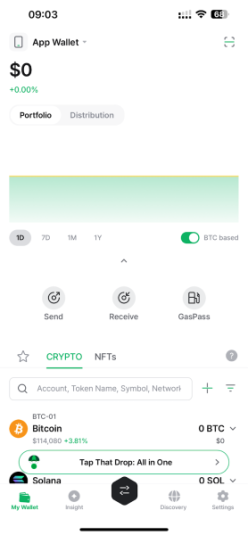
Purchases and swaps are also available directly in-app via partners like MoonPay and OKX, respectively. The fees you pay here come from the service providers along with standard blockchain gas fees – D’CENT itself doesn’t add on extra charges.
While this one-stop approach is convenient, the provider fees can be slightly higher than trading directly on an exchange.
Integrations
D’CENT integrates with a broad set of platforms, from DeFi dApps like Metamask to NFT marketplaces like OpenSea. We were impressed by how seamless it was to access these services from the wallet app.
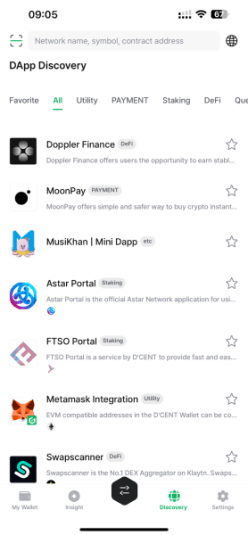
Not every integration felt equally polished, but that’s expected when you have so many to choose from. Having this breadth of access without leaving the app is a big plus if you’re active in Web3.
Web3 Campaigns & Rewards
One feature we didn’t expect to find was D’CENT’s built-in Web3 campaigns, branded as ‘Tap That Drop.’ These seasonal quests let users complete tasks tied to partner projects like Skate, MAP Protocol, and Taiko in exchange for NFTs and token rewards.
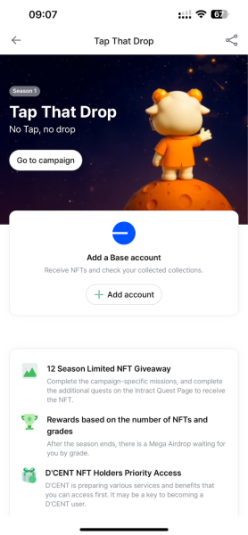
Biometric wallet owners also unlock higher-tier perks and exclusive discounts, adding extra value beyond storage and swaps. This is something we haven’t seen offered natively by most hardware wallets.
While it may not appeal to everyone, it’s a clever way of making the wallet more interactive and rewarding to use on a regular basis.
OLED Screen
The Biometric Wallet’s OLED screen is a practical touch. The display is bright and easy to read, even in low light. Verifying transaction details on-screen before confirming with the fingerprint gave us confidence we weren’t approving the wrong transfer – something you don’t always get with screenless wallets.
Multiple Wallet Accounts
D’CENT lets you generate up to 80 separate wallet accounts on one device. We found this useful for organizing assets.
For example, you could keep all your long-term crypto investments in one account and day-to-day trading funds for altcoins or low-cap coins in another. Or, you could split each token into its own wallet account for added flexibility.
D’CENT Wallet Security
IoTrust, the company behind D’CENT, was founded by ex-Samsung security engineers and has focused on payment and identity tech since 2018.
To date, there have been no reported hacks or breaches of its hardware wallets – a solid track record for a company with 700K+ users in an industry where security lapses can be fatal. That said, D’CENT is still younger than its rivals, so some may see its history as less ‘battle-tested.’
Here are D’CENT’s key security features.
Biometric Authentication
This is D’CENT’s signature feature. Instead of relying on a PIN, the device uses a built-in fingerprint scanner to confirm transactions. In our testing, it worked quickly and consistently, adding an extra layer of personalized protection.
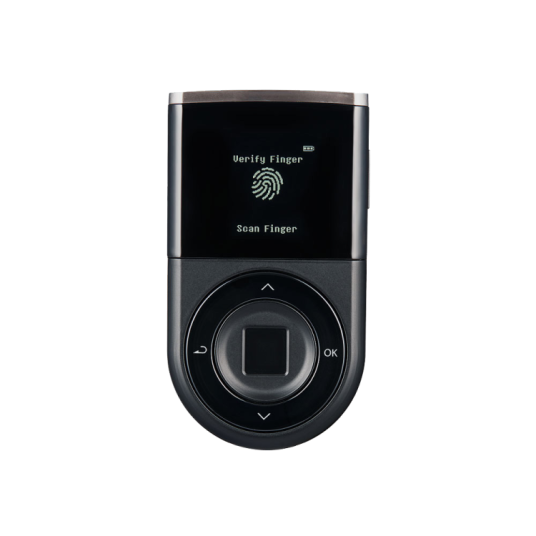
You can register up to two fingerprints, which is convenient for everyday access while limiting risk if the device ever falls into the wrong hands. If the fingerprint sensor fails, a PIN is still required, so remembering it is essential.
Secured Firmware
Every time the device powers on, it verifies firmware authenticity, blocking any unauthorized modifications.
This matters because compromised firmware is a common attack method for hardware wallets. In our D’CENT hardware wallet review, updates installed smoothly, and we liked the reassurance of the automatic integrity check.
It’s a little less flexible than some competitors, though the added steps ensure that updates stay secure.
EAL5+ Certified Chip
D’CENT uses a Common Criteria EAL5+ Secure Element chip, the same standard deployed in banking smartcards and passports. Your private keys never leave the Secure Element.
While competitors like Ledger and Trezor also rely on certified chips (with some products offering the higher-rated EAL6+ protection), EAL5+ remains a strong standard that resists both software and physical tampering.
Recovery Seed & Passphrase
Like all hardware wallets, D’CENT generates a recovery seed (BIP39 standard) during setup. This 24-word phrase is your lifeline if the device is lost or damaged.
You must write down this 24-word phrase (and 25th if you opt for it) and store it safely. If you lose your recovery phrase, there is no other way to recover your existing wallet, and your funds will be lost.
2FA and Extra Measures
While the wallet itself uses biometrics as its main two-factor method, the app also supports PIN and password security. Bluetooth connections are encrypted, and transactions only broadcast public data, which reduces exposure to external threats. This made us feel more comfortable approving transactions over Bluetooth without worrying about leaks.
D’CENT Wallet Design
The D’CENT Biometric Wallet is built with portability and security in mind. It measures 4.3 x 7.7 cm, weighs just 36g, and has a matte plastic body that feels durable without being bulky.
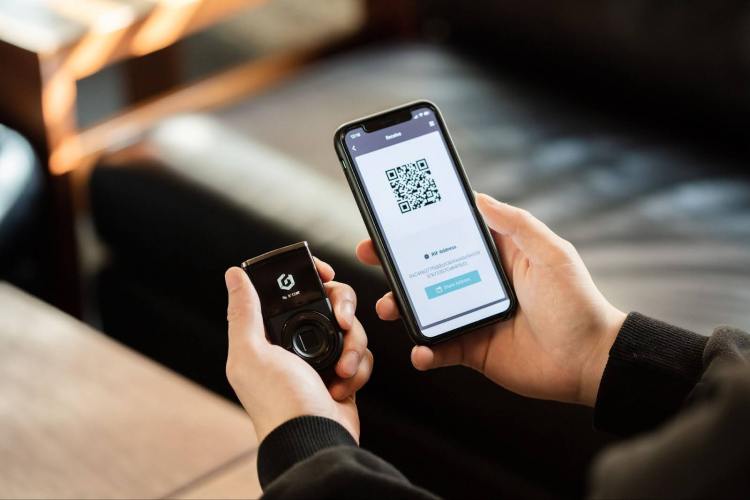
The OLED screen is bright and easy to read, while the four physical buttons make navigation straightforward. The fingerprint sensor sits front and center, letting you confirm actions quickly without relying on a PIN.
Using it in practice is simple: you start a transaction in the mobile app, double-check the details on the OLED display, and then finalize with your fingerprint. We liked this flow – it keeps the private keys locked inside the device while making transactions fast and intuitive.
D’CENT Wallet Price – Is It Worth the Money?
The D’CENT Biometric Wallet currently retails at $139.00, with bundle packs (such as the 2X package for $239.00) bringing the per-device cost down.
That puts it in the same ballpark as the Ledger Nano X ($149.00) and the Cypherock X1 ($159.00), but higher than entry-level options like the Ledger Nano S Plus (currently on sale for $59.00).
When it comes to wallet-specific fees inside the app, D’CENT does not charge anything itself. The only fees you’ll see are from specific providers within the app for swaps and fiat on-ramps.
If you value fingerprint authentication and a smooth mobile experience, the D’CENT price tag feels reasonable. The only caveat is that if you’re looking for a bare-bones cold wallet for long-term storage, cheaper models do exist. But they don’t offer the same convenience or features.
It’s worth noting that D’CENT also offers a Card Wallet, at only $38.00, for those who prefer something even more compact. This is a credit-card-sized cold wallet that connects via NFC to manage your crypto assets.
It’s cheaper than the Tangem wallet, which retails at $54.90, albeit with Tangem, you get two cards, while D’CENT only offers one.
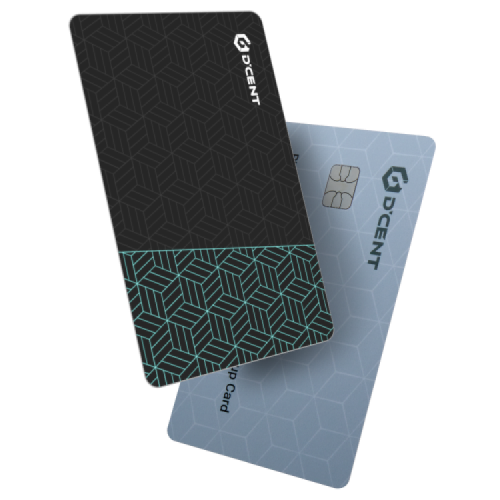
However, D’CENT’s card wallet is limited to $ETH and other EVM-compatible networks, so it won’t replace the Biometric Wallet for broader asset management. But it’s a neat low-cost option for anyone who is mostly managing Ethereum-based assets.
One last point worth factoring in: biometric hardware wallet owners receive higher-tier perks in D’CENT’s in-app campaigns, such as ‘Tap That Drop.’ That ecosystem tie-in adds ongoing value that other wallets simply don’t provide.
D’CENT Wallet App – Is it Easy to Use?
During our D’CENT wallet app review, we found the D’CENT mobile app easy to use, thanks to its polished and intuitive design. Available on iOS and Android, it serves as the control hub for balances, NFTs, swaps, and dApp browsing.
Downloading the app and creating a wallet took us less than a minute. And then pairing the app with the Biometric Wallet was equally as fast.
We especially like how the app organizes the core features into five clear tabs:
- My Wallet – For viewing and managing your crypto and NFTs
- Insight – Live market pricing and top trending crypto on CoinGecko and CoinMarketCap
- Swap – Combines bridging, cross-chain swaps, and standard swaps
- Discovery – For browsing dApps
- Settings – To manage your wallets and app settings
The app also lets you easily switch between Biometric Wallet, Card Wallet, and App Wallet modes in the Settings tab. Each mode is treated as a separate wallet with its own recovery phrase, so it’s essential to record and store each one securely.
One limitation is that there’s no dedicated desktop app or browser extension. Everything runs through mobile, which is fine if you prefer managing assets on your phone, but less convenient if you’re used to desktop-first wallets like with Ledger Live.
How Does D’CENT Wallet Compare to Other Crypto Wallets?
With so many hardware and software wallets available, it can be tough to decide which one fits your needs best. To make the choice easier, we’ve stacked the D’CENT Biometric Wallet against some of the most popular alternatives.
The table below breaks down price, best use cases, and standout features so you can quickly assess which wallet is the right fit for your portfolio.
| Wallet | Top Choice For | Price | Standout Features |
| D’CENT Wallet | Mobile-first traders who want biometric security | $139 | – Biometric fingerprint authentication
– Bluetooth-enabled hardware wallet – Up to 80 separate wallets |
| Best Wallet | Hot wallet users who want speed and presale access | Free (with benefits for $BEST token holders) | – Fireblocks MPC-CMP security tech
– Early access to presale tokens – Anonymous, non-KYC onboarding |
| Cypherock | Security-focused holders who want no seed phrase | $159 | – Seedless setup with Shamir’s Secret Sharing
– Splits keys across vault + cards – No single point of failure |
| Ledger | All-round reliability and premium build | $59–$399 | – EAL6+ certified secure chip
– Large e-ink touchscreens (Flex, Stax) – Ledger Live desktop + mobile app |
| Tangem | Budget users who prefer NFC tap-and-go | $54.90-$160 | – Credit card–sized wallet with NFC
– Wearable ‘Tangem Ring’ option – Supports 13,000+ assets |
| Ellipal | Maximum isolation from online risks | $79-$169 | – Air-gapped, QR-only transactions
– Self-destruct anti-tamper feature – Fully metal-sealed body |
Overall, we found D’CENT Wallet to be the strongest pick for those who want biometric security and mobile-first usability. That said, each wallet has its own strengths.
Ellipal may suit you if you seek maximum device isolation from online risks, and Cypherock for a seedless recovery model.
Ledger remains the go-to for a proven ecosystem, Tangem shines for its low-cost entry, and Best Wallet is worth considering if you prefer a software wallet with advanced MPC security and presale access.
D’CENT Wallet’s Reputation – What Are People Saying?
When reviewing D’CENT Wallet, we didn’t just rely on our own hands-on testing. We also looked at feedback from users across Trustpilot and Reddit to see how users found the experience.
We paid attention to ease of use, reliability, customer service, and how the wallet compares to more established brands.
Interestingly, much of what we found matched our own experience: smooth performance in most areas, but some frustrations around customer support and certain features.
Here’s an example of a recent positive review:
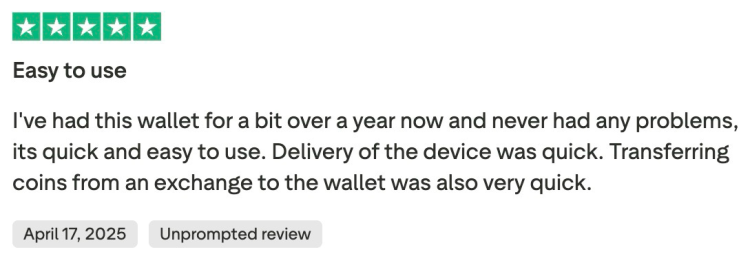
This kind of feedback is common. Many users highlight that the wallet worked smoothly for sending and receiving crypto, with Bluetooth pairing and fingerprint authentication making things feel seamless.
But not every D’CENT cold wallet review was glowing. We did see complaints about slow or unresponsive customer service. One reviewer mentioned that support didn’t reply until they left a negative rating, at which point their issue was resolved.
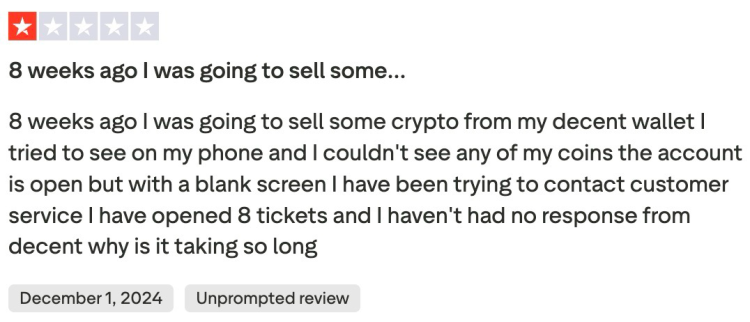
Another common complaint was that there’s no desktop app, which some people found limiting compared to wallets like Ledger.
We found the same mixture of opinions on Reddit. Some praised D’CENT’s ease of use for beginners thanks to the fingerprint sensor and mobile-first design, while others warned that it still relies on a single seed phrase backup – meaning if you lose or leak that phrase, your funds are at risk.
How to Use D’CENT Wallet – A Step-By-Step Guide
In our experience, the easiest way to get started is with the D’CENT mobile app. The process is straightforward, whether you’re connecting a Biometric Wallet, Card Wallet, or just trying the app in hot wallet mode.
Here’s the process for iOS (the Android flow is nearly identical).
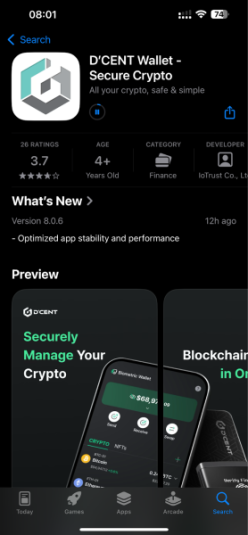
1. Download the D’CENT App from the Official Website
Go to D’CENT’s official website and click on Mobile App. From there, you’ll be directed to the App Store (iOS) or Google Play (Android) to download and install the official app.
2. Select Wallet Mode
On first launch, the app will ask you to choose a wallet type (Biometric Wallet, Card Wallet, or Mobile App Wallet). For the purpose of this walkthrough, we select ‘Mobile App Wallet.’
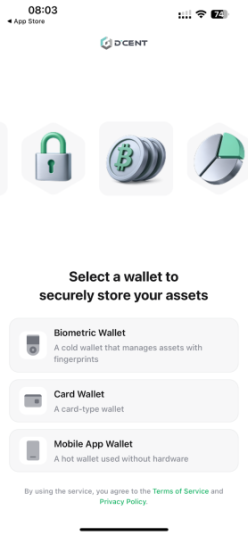
You can always connect the Biometric or Card Wallet later and switch modes under ‘Settings.’
3. Register an App Password and Allow Permissions
After selecting ‘Mobile App Wallet,’ you must select ‘Create New App Wallet.’
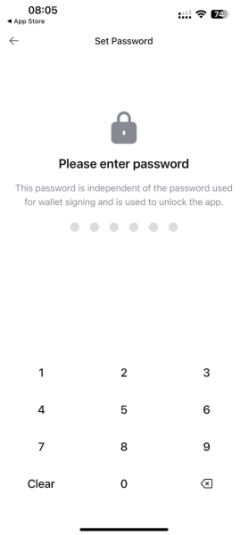
Here, you’ll need to set a six-digit passcode to protect access to the app.
The app also requests Bluetooth, Face ID, Camera, and Notification permissions. Bluetooth is required for syncing with your hardware wallet, while the others are optional.
4. Back Up Wallet
Before using any in-app services, you must back up your wallet. This involves writing down your mnemonic (recovery) code and storing it somewhere safe.
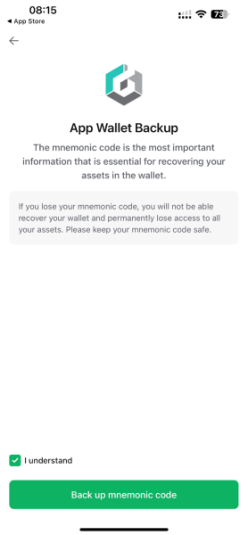
You then must verify the mnemonic code by selecting the words in the right order.
5. Add Coin Accounts
Once your wallet is backed up, you can tap ‘Add account’ to start managing assets like $BTC, $ETH, or $SOL.
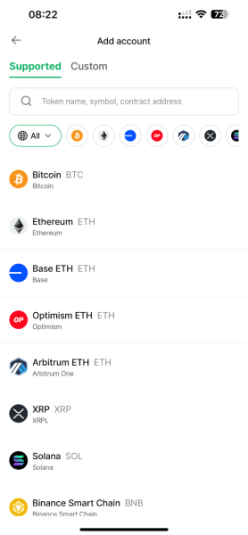
The app lets you add up to as many tokens as you like across 80 wallets, making your portfolio management flexible.
6. Pair via Bluetooth (Optional)
Head over to ‘Settings’ and ‘Manage All Wallets’ to pair your app with either the Biometric Wallet or the Card Wallet.
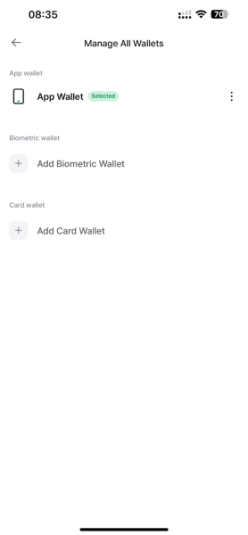
To connect your Biometric Wallet, power it on, and unlock it with your fingerprint or PIN. It should then appear as ‘D’CENT-iD-XXXX’ in the ‘Add Biometric Wallet’ list. Syncing took just a few seconds for us.
To connect your Card Wallet, simply tap ‘Add Card Wallet’ and tap your D’CENT card against your phone.
Now you’re ready to switch between and manage your D’CENT wallets.
D’CENT Wallet Review – Our Verdict
After putting the D’CENT Biometric Wallet through its paces, we found it delivers a solid mix of usability and security. The fingerprint authentication sets it apart from most hardware wallets, while the mobile app makes managing assets smooth and intuitive.
Support for 4,600+ tokens, Bluetooth pairing, and even built-in Web3 campaigns give it more depth than a simple storage device.
That said, that isn’t without trade-offs. Its Bluetooth 4.1 is a step behind newer models like Ledger Flex, and some users have reported slow customer support. For long-term storage purists, cheaper bare-bones wallets also exist.
FAQs
1. Is D’CENT Wallet safe?
Yes. The D’CENT Wallet uses a CC EAL5+ secure chip, fingerprint authentication, and offline key generation to protect assets. It also supports an optional 25-word passphrase for added security. Since its 2018 launch, D’CENT has reported no hacks with over 700K+ users. But, as with any cold wallet, your safety ultimately depends on you keeping your recovery phrase secure and private.
2. What crypto can you store with D’CENT Wallet?
D’CENT supports 4,600+ tokens across 85+ blockchains, including $BTC, $ETH, $XRP, $ADA, $MATIC, $SOL, and $DOGE. It also handles stablecoins, ERC-20 tokens, and NFTs. If your asset isn’t listed, you can request support via the ‘Crypto Asset Request’ form, and the team frequently adds new coins. This broad coverage makes it one of the most versatile hardware wallets available.
3. Is D’CENT Wallet legit?
Yes. D’CENT Wallet is developed by IoTrust, a South Korea-based security firm founded in 2017 by ex-Samsung engineers. It launched the world’s first biometric hardware wallet in 2018 and now serves 700K+ users worldwide. The company partners with major blockchain projects like Polygon, Avalanche, and Hedera, and its devices are sold through official retailers and its own website – confirming it’s a legitimate, established brand.
4. Who makes the D’CENT wallet?
The D’CENT Wallet is made by IoTrust, a South Korean company founded in 207 by former Samsung security engineers. IoTrust specializes in blockchain security solutions and launched the world’s first biometric hardware wallet in 2018.
5. How does a D’CENT wallet work?
The D’CENT Biometric Wallet works by storing your private keys offline on a secure EAL5+ chip. In practice, you manage everything through the D’CENT mobile app. When you want to send crypto, you pair the wallet via Bluetooth, approve the transaction on the device with your fingerprint or PIN, and the signed transaction is broadcast to the blockchain. This way, your private keys never leave the hardware.